

Not all training needs to be in-depth and scenario-based, nor should it all be a video. That also applies to not producing training videos alongside job aids. Sometimes a job aid will suffice, and it’s better not to offer every available option.
I think the idea that every type of training needs to be offered is a myth rooted in learning styles and the belief that a course, job aid, and video are all required. That’s not the case. It comes down more to the content dictating what type of training is necessary.
But sometimes video is the best medium, even if it’s simply the go-to because it’s popular. No, training videos aren’t always the best option, even though they’re often the most popular for consumer software and lessons (hence YouTube’s popularity). That likely has to do more with videos being easier and cheaper, but software tutorials are not necessarily better.
Not all software training should be videos, but when videos are best, these are the types to use.
When video is the ideal option, this post will help you decide which type of software training video is best. Sometimes, employees need rapid, precise guidance to complete a task in an internal application and get back to work when they forget a specific detail from a previously taken course.
Short, task‑focused videos sometimes meet that need best because they are easy to find, quick to watch, and directly actionable. Sometimes job aids are best, but when videos are, this is how to choose the most effective type.
The Types of Software Training Videos That Work Best
Only certain video formats are great for improving software skills. The following types are short, task‑based, and designed for users with foundational knowledge who need help completing specific actions.
The ideal video acts as performance support for specific short tasks rather than in-depth skills or larger topics. Software simulations in a self-paced course format are best suited for that.
Short Task‑Based Software Demos
You’ll find these aplenty on YouTube. These are single‑task recordings that show exactly how to perform a single step in the software, such as “create a new case” or “export a monthly report.” We put together a solid example of a short, task-based software demo that helps people make Word documents more accessible.
When demos are brief and sequenced to match real work, users ramp up faster and commit fewer mistakes. That gives employees the resources to increase their proficiency when they need it most, therefore improving their work speed and reducing errors.
Here is what these demos are best used for:
- Quick troubleshooting that shows a single corrective step.
- Demonstrating one system action, such as submitting a form or running a specific query.
- Showing the one workflow step required to complete a task that employees perform regularly.
We created a series of videos for one of our clients that addressed topics their help desk was frequently receiving calls about. Each video covered a brief topic and was used by the help desk to resolve issues more quickly and reduce calls in the first place.
Microlearning Video Clips for Individual Tasks
Microlearning clips are concise videos intended for moments of need. They should solve one problem, highlight two or three critical points, and be concise enough for the viewer to watch and apply immediately.
There’s sometimes an overlap with software demos, but they’re typically even shorter, with less in the task. They’re fast and easy to digest, and they aren’t always a resource people are actively seeking. Sometimes they’re pushed directly to employees through a Learning Experience Platform (LXP).
These clips are characterized by:
- One problem per clip with a clear task outcome.
- A length that allows immediate action.
- Reinforcement of the few points that matter most for task success.
Think YouTube Shorts and TikTok, but for employees.
Scenario‑Based Software Videos
Scenario videos use realistic workplace situations to demonstrate how software is used to accomplish a business task. For example, “process a customer address change from email intake to account update.”
These are likely more in-depth than the previous two, but they’re still reasonably easy to digest and focused solely on the scenario so that they may cover one to three tasks together. Scenario-based training videos for software highlight the connection between the task and the work it will be used for.
Typical scenarios these videos support include:
- Customer request processing with system steps and decision points.
- Approvals and handoffs across roles with clear status changes in the application.
- Error recovery and exception handling with the exact path to resolution.
Animated Videos for Conceptual Understanding
Animated videos are ideal for explaining system concepts when you are not showing the UI. They help employees understand how data flows, why certain rules matter, and where a tool fits within the larger operational process.
Combining visual and textual features in training videos improves comprehension of complex topics, making animation a strong choice for conceptual content.
Animation is appropriate for:
- Illustrating how data moves through the system and where it is validated.
- Explaining why certain steps or rules are required for compliance or data integrity.
- Showing where a tool fits within a broader workflow so employees know when to use it.
One recent use we’ve seen for this is explaining when to use the different chat or team features for messaging employees in Microsoft Teams. It can be a useful way to explain concepts in a simple, visual format.
An Infographic To Help
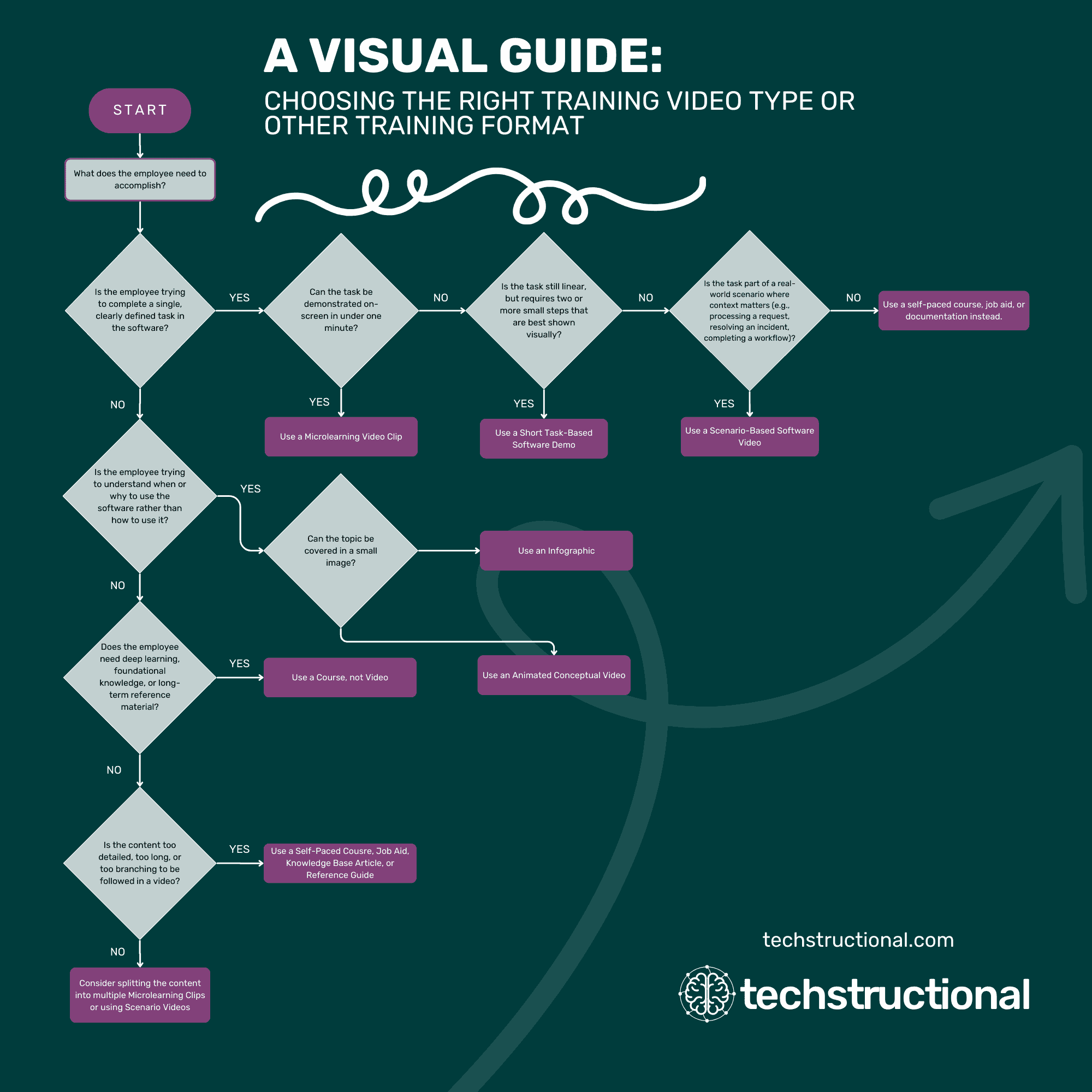
Need help choosing the right training video (or other training format) for the job? We got you covered with this helpful flowchart to help you decide.
How Not to Use Videos for Software Training
There are more don’ts than do’s when using videos for software training. It’s impossible to cover them all. This is an improvised section with key points to keep in mind before automatically jumping to videos.
One of the best things to keep in mind is this: videos are a popular form of training on the wider internet, but not necessarily the best option.
That’s right, videos are prevalent for learning all sorts of things, such as software. That doesn’t make them the best option, though. Yes, people are accustomed to them from sites like YouTube and TikTok, but that doesn’t make them ideal. In fact, many people don’t know what they’re missing until they experience a different way to learn.
Unfortunately, it’s less common for employees to have experience with high-quality software simulations that effectively help people learn and practice simultaneously.
Videos are a common way people are used to learning, but that doesn’t make them the best way.
Long recordings and foundational lectures are poor fits for video in corporate software training. Extended passive content leads employees to tune out and learn little. In fact, it drives lower engagement and weaker retention than interactive software simulations or short, task‑based videos.
We greatly caution against primary learning content that encourages passive viewing. Instead, ensure primary learning provides a foundation of learning and practicing. For topics that fit video, it must be short and focused.
When video is the best option, completion and retention with concise videos that feature clear visuals and structured steps are better.
Avoid the following uses:
- Teaching full system overviews that require deep knowledge and are meant to build foundational knowledge.
- Packing dozens of steps into one continuous recording that users must constantly pause.
- Delivering content that employees will need to revisit frequently for detailed rules or settings.
Sometimes courses are better, while other times a job aid is better than a video. Don’t assume video is the best option. They aren’t always.
When to Use a Video Versus Other Training Formats
Videos support task execution, not deep learning. A quick visual demonstration is helpful when someone needs to see a step performed. More complex or reference-heavy content works better in other formats, from interactive simulations to a format that employees can scan, search, and revisit more easily than videos, such as a job aid or quick reference guide.
The table below helps clarify when a video is the right tool and when another format is more effective.
| Training Need | Use a Video When | Use Another Format When |
|---|---|---|
| Completing a single software task | The task can be shown in under a minute and is easiest to understand by watching the clicks. | The task involves many branches, exceptions, or detailed conditions better captured in a job aid. |
| Fixing a specific error | Seeing the exact correction, button location, or sequence reduces mistakes and speeds resolution. | The error has multiple variations that require extended explanation or troubleshooting steps. |
| Providing quick reminders or refreshers | Users already know the software but need a short refresher before performing a task. | Users are learning the system for the first time and need structured, foundational learning. |
| Demonstrating workflow sequencing | Showing the exact sequence in the real UI helps employees match steps to their work. | Explaining every workflow variation, approval rules, or policy logic requires reference documentation. |
| Giving context for how software supports a process | The process is complex, spans teams, or requires a detailed explanation not suited to video length limits | The process is complex, spans teams, or requires a detailed explanation not suited to video. |
| Explaining conceptual logic or data flow | An animated explainer gives a quick, digestible overview of a concept. | Employees need a deeper understanding of architecture, configuration, or technical design. |
Videos are for showing a short task when employees already have foundational skills. Other formats are better for deep learning or repeated reference.
Short, visual, task‑aligned videos increase retention and speeds proficiency. At the same time, deeper conceptual or reference needs are better met by structured courses and written artifacts employees can scan and revisit.
If in doubt, ask us, and we can help you determine the best option. We’d also love to help you with your next training video.
Wrap Up
The best software training videos are short, direct, and designed to help employees perform one task correctly, right now. They work for people who already have a base knowledge and need targeted support.
Keep each video focused on a single outcome, sequence steps as they occur on the job with duplicative steps removed when they don’t help wider understanding, and reinforce the few points that prevent errors. Use scenario demonstrations to situate tasks in real-world work, and reserve animation for explaining the concepts behind the interface.
For deep learning or complex reference, choose courses, documentation, and job aids. This approach ensures employees have the right resources to learn on the job rather than the most popular. That means higher retention, faster proficiency, and fewer mistakes when the content is presented in the right way.
Training videos are helpful in many scenarios, but they aren’t the best type of training for software in all circumstances. It’s best to keep video content concise, visual, and task‑ordered.
Ready to work with someone to ensure you’re using the right type of training? Schedule a free consultation, and let’s discuss your needs and whether we can help boost employees’ performance so they can do their jobs better.